When I first started turning audio into text, I assumed it would take expensive software, long downloads, and way too much patience. But once I tried DeVoice, I realised you can convert MP3 to text online without installing anything. That moment changed how I work forever, and I think it’ll do the same for you.
Why MP3-to-Text Tools Matter Now
Most people don’t realise how much time they waste rewinding audio. You listen, pause, type, delete, and repeat. I’ve done it too, and it always feels slower than it should be. Online transcription tools fix that by turning your speech into text with a single upload.
The Rise of Voice Content
Look around—everyone is recording something. Podcasts, lectures, interviews, and meeting notes. MP3 is everywhere. So being able to turn an MP3 into clear text quickly is now a basic skill for students and professionals.
Why Online Tools Are Winning
I used old offline converters before, but they always slowed me down. Online AI models run on stronger servers, so the accuracy is usually better. You upload, wait a moment, and you get clean text. That’s it.
What Makes MP3-to-Text Useful for You
When I talk to creators and students, they always tell me the same thing: typing feels slow, but speaking feels natural. That’s why converting MP3 to text online helps so much. It frees your hands and saves your time.
Save Hours Every Week
Typing an hour-long meeting takes forever. Uploading an MP3 takes a few seconds. The AI handles the details, so you get more time for real work. I’ve had weeks where this saved me almost a full workday.
Improve Your Workflow
One thing I love about MP3-to-text tools is how fast you can search through text. Try doing that with audio. With transcripts, you can jump to the parts that matter or copy quotes instantly.
How MP3-to-Text Tools Actually Work
Most tools follow the same process, even if the interface looks different. I’ll walk you through how I usually do it and what steps you should watch for.
Step 1: Upload the Right File
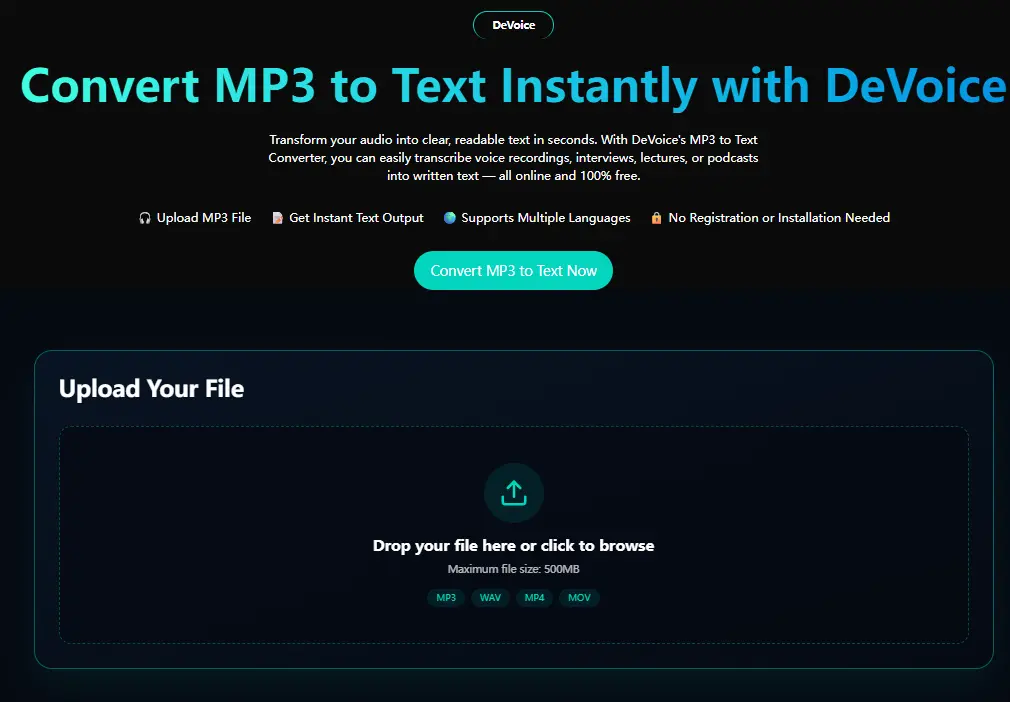
Start by finding the MP3 you want to transcribe. Then upload it. If you’re using DeVoice or similar online platforms, you’ll see a button like Upload File. Click it and let the site do the rest.
Step 2: Let the AI Process It
Once your file is uploaded, the AI begins analysing your audio. You don’t need to adjust any settings. Just wait a few seconds while the model detects speech patterns and converts them into text.
Step 3: Review the Draft
The AI will give you a transcript, usually in plain text. Read through it. If something looks off, edit it right there. The clearer your audio, the better the output you’ll get.
Step 4: Export Your Text
When you’re done, download your transcript. Look for buttons like Download, Copy, or Export. Choose the format that fits your workflow.
What to Look for in a Good MP3-to-Text Tool
When friends ask me which tool they should use, I always tell them to start with something simple. But there are specific features that make the difference between “usable” and “great.”
High Speech Recognition Accuracy
You want the AI to understand accents, fast speech, and everyday slang. A tool that fails here will make you spend more time editing than transcribing.
Clean Interface
If you need a tutorial to understand the homepage, it’s already too complicated. Online tools should feel natural the moment you land on the site.
Fast Processing Time
You shouldn’t have to wait minutes for a short recording. Modern AI should finish processing before you get bored enough to check your notifications.
Free and Online Access
This is the part I love about DeVoice and similar platforms. You don’t download anything and you don’t pay to start. Everything happens online, so you can use it anywhere.
Multiple File Formats
Even though MP3 is the most popular, tools that handle WAV, M4A, or MP4 give you more flexibility. I’ve had interviews recorded on phones that only saved as M4A, so this feature saved me more than once.
Tips to Get Better Transcriptions
You don’t need to be a sound engineer to get great results. A few simple habits make your transcripts much cleaner.
Speak Clearly When Recording
If the audio is messy, the text will be messy too. Try to avoid talking too close to the microphone or covering it with your hand.
Reduce Background Noise
AI is smart, but it’s not magic. If your room is loud, your transcript may suffer. I sometimes use noise reduction before uploading my MP3 to get cleaner results.
Use Shorter Clips
I break long recordings into smaller files. The processing gets faster, and the accuracy improves because the AI focuses on shorter segments.
Clean Up the Final Text
Even the best AI might get a few words wrong. Always read your transcript before sending it out or posting it online.
The Real-Life Benefits You’ll Notice
After years of using MP3-to-text tools, I’ve found that the biggest wins come from moments I didn’t expect.
Students Take Faster Notes
You can record classes and turn them into text without typing them yourself. I wish I had this when I was in school—it would’ve saved me years of hand cramps.
Professionals Build Better Records
Meetings, interviews, and brainstorming sessions—you can convert all of those into searchable transcripts. It helps you track decisions without writing everything down.
Creators Move Faster
Podcasters and YouTubers can turn audio into captions or scripts in minutes. This is huge when you’re trying to publish regularly.
Multitaskers Stay Organised
When everything is written down, you avoid forgetting ideas. You also keep your thoughts structured without spending extra time typing them.
Why I Recommend Starting with Online Tools
You don’t need expensive software to get started. You don’t need a powerful laptop. You don’t even need to make an account at the beginning. Online tools give you speed, flexibility, and simplicity.
I love how DeVoice lets you convert MP3 to text online immediately. No download, no setup, no stress. It feels like you skip half the work just by opening the page.
Final Thoughts: Try It Yourself Today
Converting MP3 to text online isn’t just a convenience—it’s a workflow upgrade. If you’ve been typing everything by hand or rewinding your audio again and again, it’s time to stop.
Platforms like DeVoice make the whole process quick and free to start. Upload your MP3, let the AI do the work, and enjoy the clean text you get back.
Your voice is faster than your typing. It’s time to use it.
Read more insightful articles by visiting https://swifttech3.com/how-to-stay-focused-in-class/
FAQs – MP3 to Text Online Conversion
1. What is MP3-to-text conversion?
MP3-to-text conversion is the process of turning spoken audio from an MP3 file into written text using AI transcription tools.
2. Can I convert MP3 to text online without downloading software?
Yes, many modern tools like DeVoice allow you to upload MP3 files and get text transcripts directly in your browser without installation.
3. How accurate are online MP3-to-text tools?
Accuracy depends on audio quality, background noise, and speaker clarity. High-quality recordings usually produce highly accurate transcripts.
4. How long does it take to convert an MP3 to text online?
Most AI tools process files within seconds or a few minutes, depending on the audio length and server speed.
5. Is it safe to upload MP3 files to online transcription tools?
Most reputable platforms use secure servers, but you should always check privacy policies before uploading sensitive audio.
6. Can MP3-to-text tools understand different accents?
Advanced AI tools are trained on global speech patterns and can understand many accents, though clarity still improves results.