Most people land on DreamGen AI the same way. They’ve tried ChatGPT for a story idea, been blocked mid-scene by a content filter, wandered through a couple of Reddit threads, and ended up here — a platform promising “uncensored AI roleplay and story writing.” They sign up, stare at the dashboard, click around for ten minutes, and then close the tab. Not because DreamGen isn’t good. Because nobody warned them what kind of tool it actually is.
That’s what this article is about. Not a feature list, not a pricing table rundown — though we’ll get to those too. This is the real orientation: what DreamGen expects from you, what you can realistically build with it, what breaks down on longer sessions and why, and exactly how writers, worldbuilders, and roleplay enthusiasts are actually using it in 2026.
If you’ve already done the basic research, you might be thinking, “I get it — Scenario Codex, multi-character scenes, Steering dial.” But understanding what a feature is and understanding how to use it without frustrating yourself to death are two different things. This article is the second one.
First Things First: What Kind of Tool Is DreamGen AI, Really?
Let’s clear something up that confuses a lot of people. If you search “DreamGen AI” and read the first few results, you’ll sometimes see references to an NVIDIA robotics research project also called DreamGen. That’s a completely separate thing — a research framework for generating robot training demonstrations. Nothing to do with the creative writing platform.
The DreamGen we’re talking about lives at dreamgen.com and is built for one specific purpose: giving writers and creative thinkers a structured environment to build fictional worlds and inhabit them alongside AI characters. It’s not a general chatbot. It’s not a productivity assistant. It is, in the words of its own documentation, a narrative partner — and understanding that framing changes how you approach the platform entirely.
Think of DreamGen less like a writing tool and more like a rehearsal room. You bring the world. You bring the rules. You bring the characters. DreamGen brings the actors, the memory, and the ability to improvise within the constraints you’ve set. If you walk in empty-handed, the rehearsal is going to be pretty flat.
That’s the thing most reviews miss when they say DreamGen has a “steep learning curve.” It’s not that the interface is hard to use. It’s that the platform genuinely rewards creative investment in a way that most AI tools don’t — and it genuinely punishes creative laziness in a way that most AI tools also don’t.
How DreamGen AI Actually Works: Under the Hood (Without the Jargon)
You don’t need to understand large language models to use DreamGen well, but a basic mental model helps a lot.
When you interact with any AI writing tool, there’s a limit on how much of the conversation it can “see” at once. This is called the context window — measured in tokens, which are roughly pieces of words. A 4,000-token context window means the AI is reading roughly the last 3,000 words of your story at any given moment. Everything before that? Gone from its working memory, unless you’ve anchored it somewhere.
DreamGen’s architecture is specifically built around this reality:
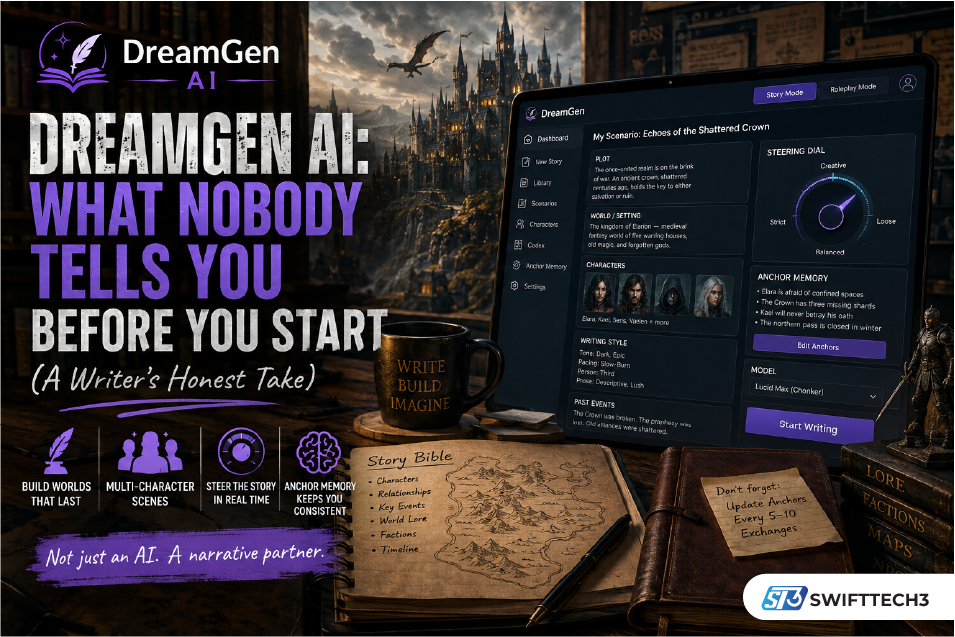
- The Scenario Codex sits outside the active story and provides persistent background — characters, lore, world rules — that gets fed into every scene
- The Anchor Memory lets you bookmark specific facts that the AI must maintain even as the story grows
- The Steering Dial lets you adjust the AI’s behavior in real-time rather than fighting it with corrective prompts
Understanding this isn’t optional. It’s the difference between a session that feels like genuine collaborative fiction and one that ends with your space captain suddenly speaking in Victorian English for no reason.
Setting Up Your First Story on DreamGen: A Step-by-Step Walkthrough
Here’s how it actually works when you sit down to start something new.
Step 1 — Create an Account (Free, No Credit Card)
Head to dreamgen.com and sign up with your email or Google account. The free tier gives you access to the full platform — both Story Mode and Roleplay Mode — with a monthly credit allocation and a small daily top-up so you never completely run dry mid-month.
Step 2 — Choose Your Mode
From the dashboard, decide whether you’re entering Story Mode or Roleplay Mode.
- Choose Story Mode if you’re writing — crafting narrative prose, developing plot, thinking like an author
- Choose Roleplay Mode if you’re playing — inhabiting a character, interacting with AI personas in real-time, experiencing the story from inside it
You can switch between these across sessions, which is genuinely useful. Many writers use Story Mode to draft a scene, then switch to Roleplay Mode to “test” a character’s voice in live dialogue.
Step 3 — Build Your Scenario (Don’t Skip This)
This is where most new users make their mistake — they skip or rush the scenario setup and go straight to generating. The result is generic, inconsistent output that makes DreamGen look worse than it is.
Click “New Story” and either start from a blank slate or select a pre-built template. DreamGen’s public library has hundreds of scenarios across genres — fantasy, sci-fi, horror, romance, mystery — all filterable by tag. If you’re new to the platform, starting from a template and modifying it is a great way to understand what a well-structured Codex looks like before building your own.
If you’re starting from scratch, you’ll be filling in:
- Plot — What’s the central conflict or situation? What’s the starting point?
- Characters — Name, appearance, personality, backstory, relationships to other characters
- World/Setting — Key locations, factions, cultural rules, historical context
- Writing Style — Tone (dark, comedic, romantic, literary), pacing (fast-action vs. slow-burn), person (first vs. third)
- Past Events — Anything that happened before the story starts that the AI should treat as established canon
Fill these in with real detail. Two sentences per character won’t cut it. Write the kind of character backstory you’d be happy reading in a published novel. The more specific you are here, the more specific DreamGen’s output will be.
Step 4 — Pick Your Model
Before you hit “Start Writing,” choose your AI model. DreamGen has two main first-party options:
- Lucid Base — Faster, lighter, great for moderately complex scenarios. Lower credit cost. Recommended for your first session.
- Lucid Max (Chonker) — Deeper, more capable, better at maintaining distinct character voices across a large cast. Higher credit cost. Worth it for serious multi-character work.
Third-party models like GLM 4.7 are also available — these have different stylistic personalities and credit costs, and are worth experimenting with once you’ve got a feel for the platform.
Step 5 — Write, Steer, and Iterate
Once you start, DreamGen generates the opening of your story or scene. From here you have several controls:
- Continue — Let the AI advance the story on its own
- Regenerate — Get a different version of the same moment
- Instruction — Tell DreamGen exactly what should happen next (“Elara discovers the map is a forgery” / “The conversation turns hostile”)
- Steering Dial — Adjust how strictly or creatively the AI is interpreting its instructions, in real-time
The Instruction feature is the one most users underuse. You don’t have to sit back and let the AI drive — you can give it precise plot directions at any point, which is closer to co-authoring than passive generation.
The Context Drift Problem: What It Is and How Real Writers Handle It
If there’s one thing that consistently surprises new DreamGen users, it’s context drift. You’re twenty-five messages into a story. Your morally grey assassin — cold, calculating, speaks in short sentences — starts rambling philosophically. The villain you defined as charismatic and soft-spoken suddenly turns threatening and loud. The plot detail you established in scene two vanishes without explanation.
This isn’t a DreamGen bug. It’s a fundamental characteristic of how large language models work. As your story grows longer, earlier context slides out of the active window. The AI can only “see” what’s currently in range.
Here’s the honest reality: even on the Pro plan with its 30,000-token context window, drift happens. It’s just slower. No current AI platform has fully solved this. DreamGen manages it better than most — but it doesn’t eliminate it.
What the DreamGen community has developed to handle it:
The Story Bible Method — Experienced users maintain a short document outside the platform (usually a Notes app or Google Doc) that tracks the current state of their story: character emotional arcs, key decisions made, inventory items, relationships that have shifted. Every fifteen or so prompts, they paste a condensed version of this back into the Anchor Memory settings to refresh the AI’s reference point. This is a workaround invented by users, not a native DreamGen feature — but it works remarkably well.
Anchor Memory Discipline — DreamGen’s Anchor Memory tool is only as good as the attention you give it. Set anchors for core facts before they become relevant in the story, not after they’ve already drifted. Think of anchors as the things you’d underline twice in a script.
Shorter, Deliberate Sessions — Many writers cap individual DreamGen sessions at fifteen to twenty exchanges and use the Instruction feature heavily throughout, rather than letting the AI run long stretches unsupervised. It’s a different rhythm than most people expect from an AI tool, but it produces far better results.
Who Is Actually Using DreamGen — and What For?
The platform’s user base is more diverse than you might expect. Based on community feedback and the platform’s own positioning, here’s who’s getting real value from DreamGen in 2026:
Fan Fiction Writers
This is probably DreamGen’s most enthusiastic community. Fan fiction writers working in established universes (anime, fantasy novels, gaming franchises) love the ability to define canon rules in the Codex and then write within those rules without the AI hallucinating contradictions. One user on the platform’s Discord described it as “the first AI that actually respects my source material instead of inventing plot points from other shows.”
Tabletop RPG Dungeon Masters
DMs use DreamGen to simulate multi-character scenes and test how NPCs will react to player decisions before a session. The multi-character functionality is particularly valuable here — you can run a scene with three or four NPCs interacting simultaneously, each with distinct voices, and get a feel for the group dynamic before sitting down at the table.
Novelists and Long-Form Fiction Writers
Writers working on original novels use DreamGen primarily in Story Mode for outlining, drafting scenes, and exploring alternative narrative paths. The ability to set specific writing style parameters — including prose density, sentence length rhythm, and tone — makes it more useful as a genuine writing partner than tools that generate generically-styled text.
Game Designers and Worldbuilders
Game studios and indie developers have started using DreamGen to prototype questlines, NPC dialogue, and lore entries. The Codex system is well-suited to the kind of detailed, consistent worldbuilding that game narratives require.
Creative Writing Students and Educators
Some educators use the platform to set up scenario-based writing prompts that students then navigate — using DreamGen’s steering features as a way to explore how small changes in character motivation or plot direction produce very different narrative outcomes.
DreamGen AI Pricing: What You’re Actually Getting at Each Tier
Rather than just listing numbers, here’s a practical take on which plan makes sense for which kind of user:
| Plan | Price | Context Window | Best For |
|---|---|---|---|
| Free | $0 | Limited | Testing the interface, short story experiments |
| Starter | ~$7.83/mo | 4,000 tokens | Casual writers, shorter single-scene sessions |
| Advanced | ~$19.35/mo | 8,000 tokens | Regular users, moderate multi-character work |
| Pro | ~$48.30/mo | 30,000 tokens | Serious long-form writers, heavy users |
The honest context window reality: 4,000 tokens — the Starter plan — is around 3,000 words of active context. For a scene involving two characters in a simple setting, that’s fine. For a complex multi-character scenario with rich lore, it gets tight fast. Most users doing real creative work find the Advanced tier at 8,000 tokens to be the functional minimum.
On the free plan: The free tier is more useful than it first appears. On the Lucid Base model, 100 credits can generate roughly 300 pages of average book-length prose output — that’s a meaningful creative test, not just a teaser. Credits reset monthly, and you get a daily top-up so there’s no hard wall mid-session.
New user discount: New users get a 50% discount for the first month on all plans, which makes it easy to test the Advanced or Pro tier before committing to the full price.
Check the current DreamGen pricing page for up-to-date rates — the credit calculator there is actually quite useful for estimating your usage before you upgrade.
DreamGen’s Real Weaknesses: An Honest Assessment
No platform worth taking seriously should get a pass on its genuine problems. Here’s what’s legitimately worth knowing:
Context drift is real and ongoing. Even the community workaround — pausing every five scenes to summarize the story state and paste it back into the Anchor or Lore field — is a manual compression trick invented by users, not a native feature. DreamGen’s marketing language around “effortless AI roleplay” doesn’t quite match the disciplined maintenance that consistent quality actually requires.
The learning curve separates users quickly. Many users bounce on the first night. The platform doesn’t hold your hand through Codex setup, and users who skip it get generic output that makes DreamGen look far less capable than it is. Better onboarding for new users would help significantly.
Non-English users get a worse experience. The models handle basic syntax in major languages like French, Spanish, and German, but tonal nuance and narrative consistency drop noticeably outside of English. This is worth verifying on the free tier before committing to a subscription if you’re writing in another language.
Corporate transparency is limited. The legal entity behind DreamGen isn’t clearly disclosed in public-facing documentation — the company information in the privacy policy is rendered as an image rather than copyable text. For a platform that stores your creative content and payment information, this is a legitimate concern that the team should address more directly.
No mobile app. DreamGen runs in your browser, which works fine on desktop. Mobile browser use is functional but not ideal for extended writing sessions.
DreamGen vs. The Alternatives: A Practical Decision Guide
Rather than a comprehensive feature comparison, here’s the simplest possible guide for making the right choice:
Choose DreamGen if: you want a structured creative writing environment with persistent world-building, multi-character scene support, and real narrative control. You’re willing to invest setup time in exchange for genuinely consistent, immersive output.
Choose Character.AI if: you want a casual, social AI chat experience with a massive library of existing characters and no setup required. You don’t need content freedom and you’re not primarily interested in writing.
Choose NovelAI if: raw prose quality is your top priority and you’re comfortable with a technically demanding platform. NovelAI’s models are trained on published fiction and the writing quality is arguably the best in class — but the learning curve is steeper and the roleplay mechanics aren’t as developed.
Choose Candy AI if: you want an AI companion experience rather than a writing tool. Emotional engagement and relationship-style interaction are the priority, not narrative architecture.
Choose DreamGen with SillyTavern if: you’re a power user who wants full control over the frontend, model parameters, and system prompts. The SillyTavern documentation has community-built guides specifically for DreamGen API integration, and the Reddit community at r/SillyTavern is active and helpful.
6 Things That Will Make You a Better DreamGen User From Day One
These aren’t obvious from the interface. Most of them come from watching experienced users in the Discord community and reading Reddit threads where writers talk about what actually changed their results.
1. Write your characters like they’re real people, not archetypes. “She’s a cunning rogue with a troubled past” is an archetype. “She grew up pickpocketing merchants in the harbor district and has a genuine phobia of enclosed spaces after being trapped in a collapsed building at age nine” is a character. The AI responds to specificity.
2. Set the writing style before you write a single scene. DreamGen’s style settings let you specify sentence length, prose density, pacing, and tone. If you want sparse, punchy prose — set that explicitly. If you want lush, descriptive narration — set that too. The default output will satisfy neither camp.
3. Use the Instruction feature more than the Continue button. Passive generation builds dependency on the AI’s choices. Active instruction keeps you in the director’s chair. “Continue” is for when you genuinely like where things are going. “Instruction” is for everything else.
4. Treat regeneration strategically, not as a do-over. Every time you regenerate, you’re sampling a different output from the same prompt. If regeneration consistently produces unsatisfying results, the problem is usually in the prompt or the Codex — not the model’s capability.
5. Join the DreamGen Discord. The developer is genuinely active there. Features have been added in direct response to user requests. Problems get answered faster than through the support email. The community has also built a library of Codex templates and character card formats worth borrowing from.
6. Don’t judge the platform on your first session. Most users who become serious DreamGen advocates had a frustrating first hour. The platform clicks once you understand the Codex-first philosophy. The second session is usually dramatically better than the first.
Frequently Asked Questions
What’s the difference between DreamGen AI and NVIDIA’s DreamGen?
Can I use DreamGen to write a full novel?
Does DreamGen save my stories?
Is DreamGen AI appropriate for younger users?
How do I cancel my DreamGen subscription?
Does DreamGen work on mobile?
Can I import characters from other platforms into DreamGen?
The Bottom Line: DreamGen Is a Craft, Not a Button
Here’s the thing about DreamGen that doesn’t show up in feature comparison tables. The gap between a mediocre DreamGen session and an exceptional one isn’t about which pricing tier you’re on or which model you’ve selected. It’s about how much creative investment you brought in before the AI started generating.
That’s frustrating for users who want instant results. It’s genuinely exciting for writers who’ve been looking for a tool that treats their creative work seriously enough to demand something from them.
The people who get the most out of DreamGen treat it like pre-production on a story. They spend time building their world before they start writing. If you skip that step and jump straight into a scene, the output feels generic.
That sentence should be on the DreamGen homepage. It’s the most accurate thing you can say about the platform.
If you’re a writer who cares about fictional consistency, character depth, and narrative control — and you’re willing to do the prep work — DreamGen is probably the most capable text-first AI storytelling platform available right now. Start on the free tier, build a world you actually care about, and see what happens.
Visit : Swifttech3