


Your day starts with a good intent. Then alerts hit even before your coffee is done. Some of them look urgent, while others feel routine. Still, everything needs to be reviewed.
By the time real threats appear, energy is already spent. This daily pressure is not about skill. It is about volume. That is why many teams now deploy security automations to regain control of their workday.
Security teams are not slow. They are overloaded. Manual steps pile up. Context switching becomes the norm. Stress builds when every alert feels equal. Deploying security automations does not remove people from security. It eliminates the noise that blocks good judgment.
What is Security Automation?
Deploying security automations means setting up predefined actions to handle recurring security tasks without human input. These actions follow rules designed by the SOC team. The goal is simple. Let systems handle predictable work so people can focus on real threats.
So, when teams ask, what is deploy security automations? The answer is not a tool or product. It is a shift in how work flows. Automation reduces the response time thus reducing the chances of human error during incidents. Change does matter when minutes decide the outcome.
Why SOC Teams Choose to Deploy Security Automations
Time is the first win. Tasks like alert triage, log collection, and enrichment consume hours each day. When teams deploy security automations, those hours return to investigation and learning.
The second win is stress. Alerts come with context already attached. Analysts do not waste their time in guessing and focus more on deciding. These are the true benefits of deploying security automations that show up quickly in daily work.
The SANS SOC Survey reports that teams using automation see better consistency in alert handling. Consistency builds trust between shifts and across teams.
How to Implement Security Automations in SOC?
Implementation should not begin with ambition but rather with pain points. For example, pick one task that drains your focus every day. Like phishing triage is a good start. Map the steps that an analyst follows. If you find those steps to be repeated, automate them.
Rules should reflect reality. Avoid complex logic early. Simple actions that enrich data or close known false positives give fast value. All of these steps show best practices for deploying security automation shared by mature SOC teams.
IBM research shows early automation reduces incident dwell time when applied to alert triage. Starting small helps teams build confidence before expanding automation deeper into workflows.
Deploy Security Automations Use Cases that Matter
One everyday use case is phishing response. Phishing response is one of the most successful automation use cases worldwide. Verizon Data Breach Investigations Report, phishing is involved in over 36 percent of all data breaches, making it the most common attack vector today. Organizations that automated phishing analysis and response reduced investigation time, allowing analysts to focus only on high-risk emails.
Another use case is login anomaly detection. Login anomaly detection shows similar gains. According to Atera, organizations using automated detection for unusual login behavior identified compromised accounts faster than teams relying on manual review.
Alert noise reduction is another proven outcome. A SANS Institute SOC survey found that teams using security automation for alert triage reduced false positives by around 70 percent, leading to better analyst focus and lower burnout rates.
All the above use cases were successful, as they removed volume before humans even engaged. The outcome is not just a fast response but also calmer, more consistent security operations globally across all teams.
Security Automations vs Traditional Methods
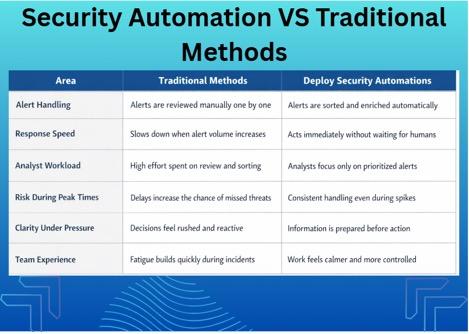
Traditional methods depend on manual review. They work until alert volume spikes. Then delays appear, and fatigue sets in.
When teams deploy security automations, systems act immediately. Alerts get sorted, enriched, and put on priority before humans engage with them. Speed is not the only element of differentiation between deploying security automations and traditional methods. It is more about bringing clarity under pressure.
Manual workflows depend on people to respond, whereas automated ones prepare information in advance. This changes how teams feel during incidents.
The Human Impact of Deploying Security Automations
Automation does not remove control; it adds structure. Because every action is logged and visible, the analysts understand why decisions happen. In this way, the junior analyst benefits mostly, as they learn from clean examples rather than messy queues.
FAQs
Deploying security automations is the practice of using systems to handle repetitive security tasks based on predefined rules. It reduces manual effort and improves response clarity.
It saves time, reduces stress, and improves alert quality. Analysts spend more time investigating and less time sorting noise.
Poor planning is the biggest challenge. Automating broken processes spreads mistakes faster. Teams should start with a small review often and adjust rules based on real outcomes.
When Security Work Starts to Feel Human Again
Security work was never meant to feel endless but rather deliberate. When every alert requires the same energy, then judgment suffers, and fatigue follows. This does not sound like a people’s problem but rather a workflow one.
Something to reflect upon: analyze your last busy shift! From that, think of the task that drained focus without adding any insight? This shows that the task is ready for you to deploy security automations, which will not replace thinking but will protect it.
The work will stay serious. Threats will still evolve. Incidents will still demand attention. The difference is how the day feels while handling them. Less rush. Fewer guesses. More space to think clearly when it matters most.
Deploying security automations does not change why security teams exist. It changes how they survive the pressure that comes with the job. When systems perform repetitive tasks, people can return to what they do best: making sense of risk, taking calm decisions, and ending the shift with energy left for the next one.
